REVIEW · SYDNEY
Australia and New Zealand eSIM (3 to 30 days. Up to 45GB)
Book on Viator →Operated by Xplori · Bookable on Viator
A phone that stays connected makes travel calmer. This eSIM for Australia and New Zealand gives you data fast, so you can plan, message, and navigate without airport SIM stress. I especially like the email delivery with QR-code activation and the fact that the plan is built for both countries, not just one. One thing to watch: your phone must support eSIM, and setup can take a little patience if you’re doing it for the first time.
Here’s the practical appeal: you choose how long you need—3 to 30 days—then you get a data package for that window. In your day-to-day, that means you can use maps and keep in touch without hunting for Wi‑Fi every hour. The tradeoff is also practical: high-speed data is capped, and once you hit your allowance, speeds drop to 3G.
If you’re the type who hates last-minute surprises, this will feel like a win. Get it before you leave, double-check eSIM compatibility, and you’re set up to land with a working connection instead of scrambling for a counter clerk.
In This Review
- Key highlights worth knowing
- eSIM for Australia and New Zealand: the real advantage
- Price and data limits: what $5 is buying (and what it’s not)
- Activation by email and QR code: setup in plain language
- Using 4G/5G at local-style rates (and what happens after)
- Sydney start, then Australia to New Zealand: how to keep it smooth
- Support and written help: how Xplori handles the tricky moments
- Who should book this eSIM (and who should think twice)
- Should you book the Xplori eSIM for Australia and New Zealand?
- FAQ
- FAQ
- How long is the eSIM data plan valid for?
- What data allowance do I get?
- Does it work in both Australia and New Zealand?
- How do I receive the eSIM?
- How do I activate the eSIM?
- Do I need an eSIM-compatible phone?
- What happens after I use up the high-speed data?
- Is there customer support if I have trouble?
- Is there a guide included?
- Can I cancel if my plans change?
Key highlights worth knowing
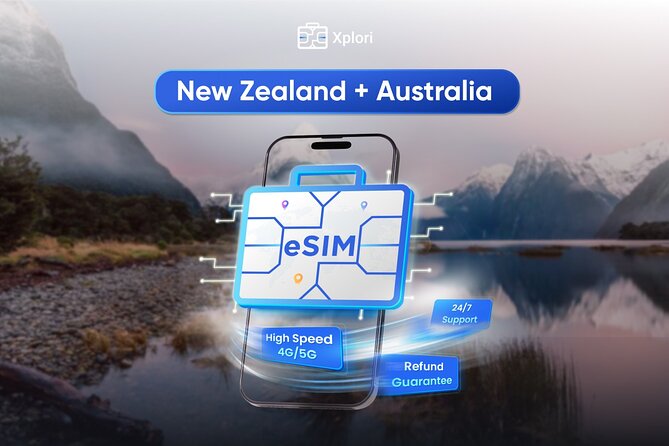
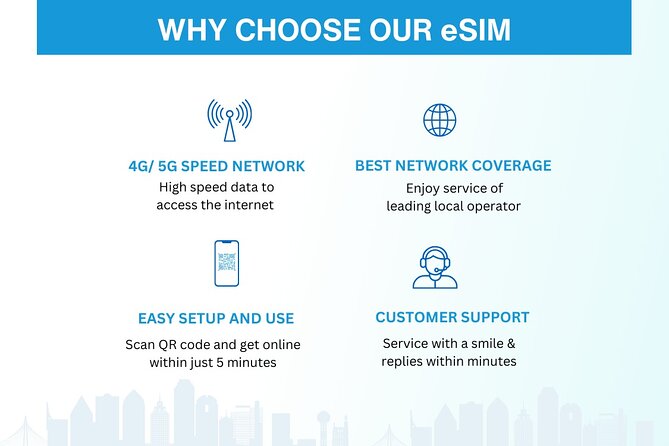
- 4G/5G where available for help with navigation and messaging throughout Australia and New Zealand
- Choose your trip length (3–30 days) instead of paying for more time than you need
- Email delivery + QR code activation means you can start using it minutes after setup
- Local-rate style data is the point, so you avoid typical roaming hassles
- Data cap then 3G keeps the price low, but you should expect slower speeds after you use it all
- Remote support by email helps if activation or settings feel confusing
eSIM for Australia and New Zealand: the real advantage
The big idea here is simple: you get one eSIM plan that covers both Australia and New Zealand, so your phone doesn’t need a new SIM every time you cross the Tasman. That matters because travel is full of small frictions—airport lines, buying counters, figuring out packages in a language you don’t speak, and then praying the SIM works in the first five minutes.
With this plan, you’re not trying to solve connectivity after you’ve already arrived. You set it up ahead of time, activate it with a QR code, and keep moving. I like that the value isn’t just “internet exists.” It’s internet when you need it: directions through city streets, checking transit updates, and keeping your group or family in the loop.
Also, Sydney is your start point in the experience details (it’s the base location), but the data plan itself is designed to work during your trip in both countries. So your “home base” can be one city, while your data still matches the whole route.
You can also read our reviews of more tours and experiences in Sydney.



Price and data limits: what $5 is buying (and what it’s not)
At $5.00 per person, this is priced like a convenience product. And yes, it’s described as cheaper than buying a SIM at the airport. That’s usually where you pay for speed, not for value—time lost in lines plus markup in the price. This eSIM is meant to swap that chaos for a low-cost, pre-arranged option.
The key detail is that it’s not an unlimited plan. You get a data package for your selected duration, with a headline of up to 45GB. After you use the high-speed portion, the service switches down to 3G data speed.
What that means for you in real travel terms:
- If you mostly use messaging, web checks, and occasional map use, you can probably stretch the high-speed part longer.
- If you plan to stream a lot of video or upload heavy photos over cellular data, you’ll hit the cap sooner and spend more time on slower speeds.
So I treat this as a “connectivity backbone,” not as a “turn on data-hog mode” pass. For most trip planning and normal phone use, it works well. For heavy media users, you’ll want to plan for Wi‑Fi when possible.
Activation by email and QR code: setup in plain language
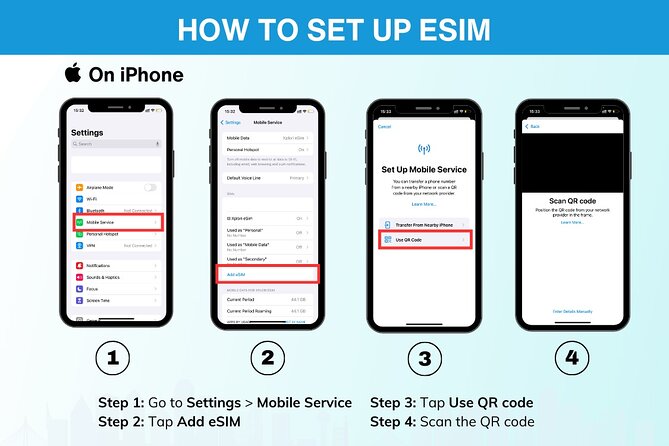
Here’s how the experience is designed to work:
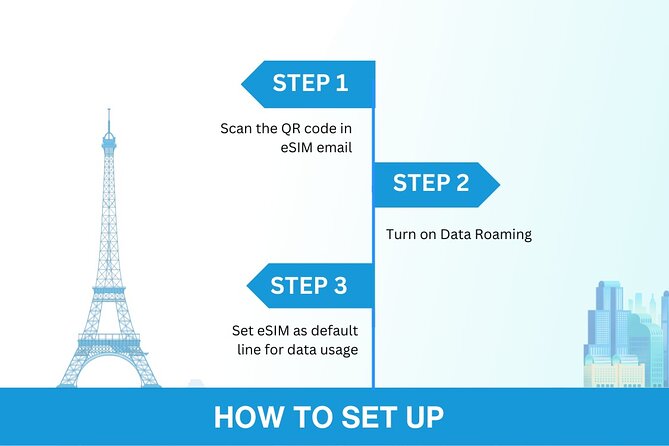
- You order and get your eSIM info by email.
- You activate by scanning the unique QR code provided.
- Your phone then gets the eSIM profile for your selected data window.
Activation is the one step that can feel intimidating if you’ve never done eSIM before. The good news is the process is built to be quick, “within minutes,” not a multi-hour tech project. The product also encourages you to contact the provider in advance if you’re unsure.
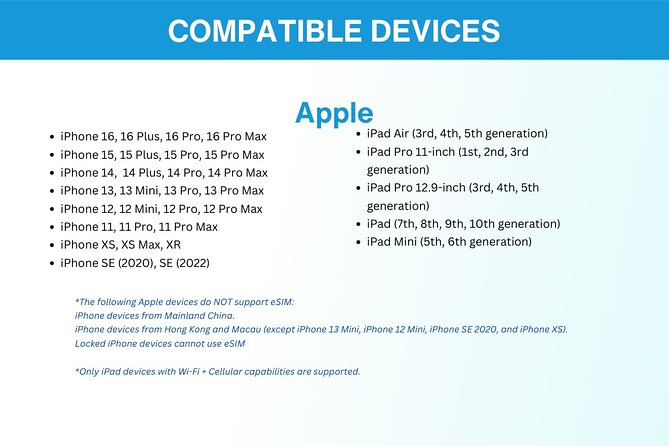
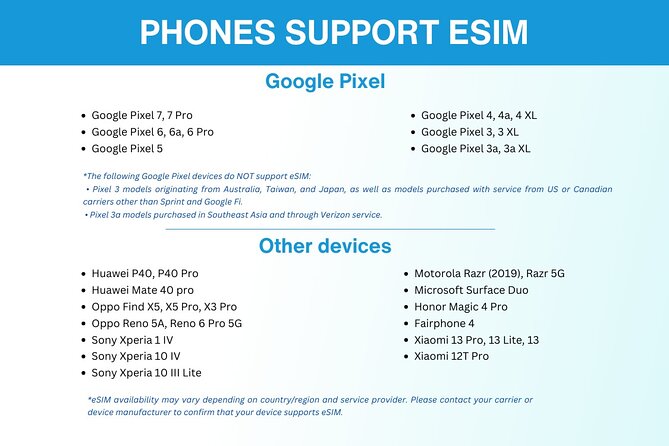
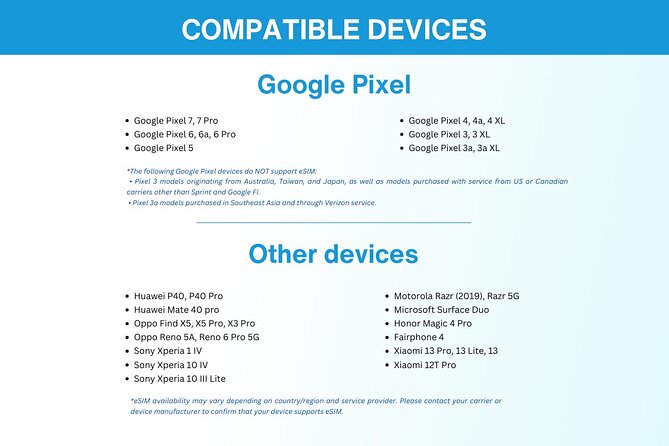
Now for the practical part: you must confirm your phone supports eSIM. The data here lists examples such as:
- iPhone XS and later
- Google Pixel 3 and later
- Samsung S20/S21 and Fold
If your phone isn’t on that list, don’t assume it will work. Check your settings first. This is the most important “don’t get burned at the last minute” item in the whole experience.
One more setup tip I’d give you: treat activation like laundry—you want it done before you need it. Try setting it up on Wi‑Fi at home so you can focus without worrying about signal.
Using 4G/5G at local-style rates (and what happens after)
The plan provides 4G/5G data where available, and it’s positioned as “local rates.” That’s travel-speak for: you should be able to use data like you would at home, not pay international roaming premiums every time you open a map.
You’ll feel this most when you’re moving around. A working data connection means:
- Maps that update without hunting for Wi‑Fi
- Quick searches for food, tickets, opening hours, and directions
- Messaging with real-time location sharing
Then comes the cap: once you use your allowance, speed drops to 3G. If you’re wondering whether that’s “still usable,” the honest answer is: it’s usually fine for light tasks, but it can get annoying for anything data-heavy. So I suggest you plan for that shift. For example, if you know you’ll be doing lots of directions and research in one day, save that for when you’re still in the high-speed portion.
Sydney start, then Australia to New Zealand: how to keep it smooth
Since the start point is listed as Sydney, you might imagine the experience is tied only to Australia. But the plan itself covers both Australia and New Zealand, which is what makes it useful for multi-country trips.
To keep it smooth across borders, think about these phone habits:
- Keep the eSIM active after activation.
- Avoid swapping SIM cards mid-trip unless you know exactly what you’re doing.
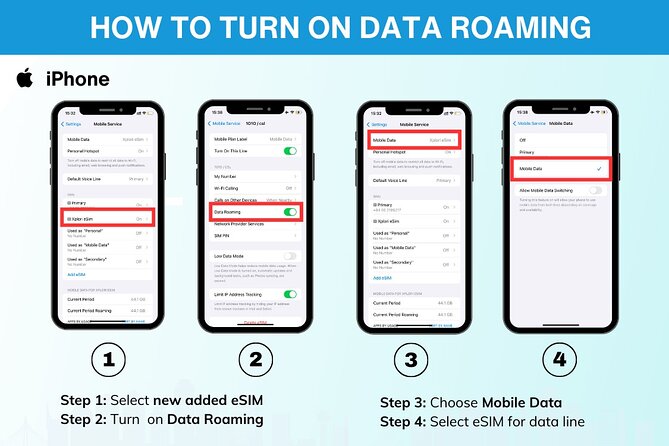
- If your phone has multiple lines, make sure mobile data is using the correct profile.
The product’s promise is “stay connected” across both places. That only works if your phone is actually set up to use the eSIM for data. The good thing is that the activation steps are guided by the QR code system, so you’re not guessing.
What could trip you up? If you wait until the last moment to activate, you might be doing setup while jet-lagged and your time window is tight. This is one travel task where “do it early” is genuinely worth it.
- Blue Mountains Small-Group Tour from Sydney with Scenic World,Sydney Zoo & Ferry
★ 5.0 · 3,709 reviews



Support and written help: how Xplori handles the tricky moments
Not every eSIM activation goes like clockwork. Even with a QR code, it’s easy to get stuck if your phone settings are off, or if you’re unsure where to find the activation prompt.
That’s where the included support helps. The experience lists remote customer service via email, plus a written English guide. I like that this isn’t just marketing; it’s practical help when the setup feels confusing.
And one of the strongest bits from the experience feedback is the theme of trust and support. I’d interpret that as: if you run into issues, the provider doesn’t leave you hanging. Still, email support has limits, so don’t wait until the moment you absolutely need the data.
If you want a simple approach:
- Activate as soon as you receive the email.
- Confirm data works before you board any long travel day.
- Save the confirmation email and QR info somewhere you can find it quickly.
Who should book this eSIM (and who should think twice)
This is a great fit if you:
- Want one plan for Australia + New Zealand
- Need data for navigation and messaging without airport lines
- Have an eSIM-compatible phone (check iPhone XS+, Pixel 3+, Samsung S20/S21/Fold)
- Prefer handling setup from your couch instead of at a counter
You might want to think twice if you:
- Are traveling with a phone that doesn’t support eSIM
- Expect heavy video streaming or lots of downloads over cellular (because of the speed cap then 3G)
- Need fully detailed, local, in-person guidance on the ground (this is data service support, not a tour host meeting you daily)
This product is also ideal for solo travelers and couples who want straightforward connectivity without a lot of fuss. Families can use it too, but make sure every phone involved is eSIM-compatible before you rely on it.
Should you book the Xplori eSIM for Australia and New Zealand?
I’d book it if your priority is simple: get data quickly, avoid airport SIM hassles, and cover both countries with one setup. At $5, the value is hard to ignore, especially for trips where you’ll be using your phone for maps and staying in touch.
I’d hesitate if you’re on the edge of your phone’s compatibility or if you know you’ll burn through data fast. In those cases, the cap and the 3G slowdown after your allowance can become a real annoyance.
My bottom line: this is a smart choice for planning-heavy travelers who want reliable phone connectivity, not a “unlimited everything” plan. If you confirm eSIM compatibility and activate early, you’ll likely find it an easy win.
FAQ
FAQ
How long is the eSIM data plan valid for?
You can choose a plan duration of 3 to 30 days.
What data allowance do I get?
The offer states up to 45GB (with a speed cap applied after the included high-speed amount is used).
Does it work in both Australia and New Zealand?
Yes. The data plan covers both Australia and New Zealand.
How do I receive the eSIM?
You receive the eSIM details by email after ordering.
How do I activate the eSIM?
You activate it by scanning the QR code provided in your eSIM email.
Do I need an eSIM-compatible phone?
Yes. Your phone must support eSIM. Examples listed include iPhone XS and later, Pixel 3 and later, and Samsung S20/S21/Fold.
What happens after I use up the high-speed data?
After the high-speed data cap is reached, the service switches to 3G speed.
Is there customer support if I have trouble?
Yes. The experience includes remote customer service via email.
Is there a guide included?
Yes. A written English guide is included.
Can I cancel if my plans change?
Yes. You can cancel for a full refund up to 24 hours before the experience’s start time.
You Might Also Enjoy




More Tour Reviews in Sydney
- Blue Mountains Small-Group Tour from Sydney with Scenic World,Sydney Zoo & Ferry
★ 5.0 · 3,709 reviews